Egyptian-Museum-Artifact-Detection
🏛️ Egyptian Museum Artifact Detection
📖 Overview
Egyptian Museum Artifact Detection is an innovative AI-powered application that revolutionizes museum experiences by combining computer vision, natural language processing, and interactive learning. Built for the Egyptian Museums, this platform enables visitors to instantly identify and learn about 84 iconic Egyptian artifacts through smartphone camera scanning or text search.
🎯 Project Goals
- Democratize Cultural Heritage: Make Egyptian history accessible to all visitors regardless of language or background
- Enhance Museum Engagement: Transform passive observation into active learning experiences
- Preserve & Educate: Bridge the gap between ancient artifacts and modern technology
- Support Egypt Vision 2030: Contribute to digital transformation in cultural tourism
✨ Features
🔍 Intelligent Artifact Recognition
- Real-time Detection: YOLOv8-powered object detection identifies artifacts instantly
- 84 Artifact Classes: Comprehensive coverage of iconic Egyptian treasures
- High Accuracy: 92%+ confidence scores for optimal user experience
- Mobile Optimized: Fast inference times (<3 seconds) on mobile devices
🤖 AI-Powered Cultural Analysis
- Contextual Descriptions: Groq LLaMA generates rich historical narratives
- Adaptive Content: Tailored explanations for different audience levels
- Multi-modal Learning: Visual and textual information integration
- Vision + Text Models: Intelligent switching between image and metadata analysis
🔎 Advanced Search Capabilities
- Museum Database Integration: Direct access to The Metropolitan Museum of Art API
- Semantic Search: Find artifacts by name, culture, period, or artist
- Interactive Results: Click any artifact for instant AI analysis
- Image Gallery: High-resolution artifact photography
📱 Modern User Experience
- Responsive Design: Seamless experience across mobile, tablet, and desktop
- Intuitive Interface: Clean, accessible design with ShadCN UI components
- Progressive Enhancement: Works offline with cached data
- Real-time Feedback: Loading states and progress indicators
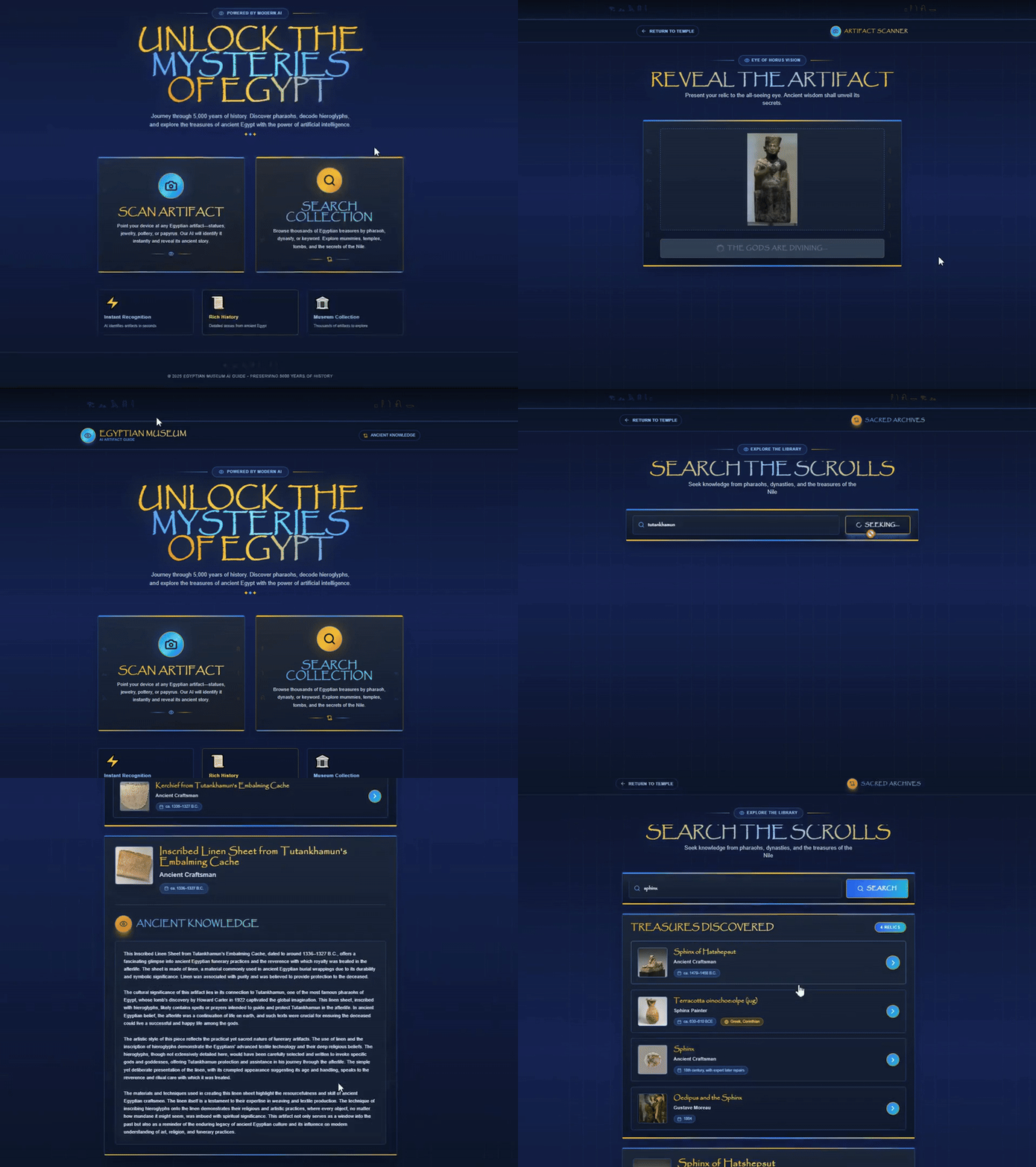
🎬 Demo
Artifact Scanning Flow
 Upload an image → AI detects artifact → Receive historical context
Search & Discovery
 Search Egyptian artifacts → Browse results → Explore cultural significance
Live Demo
🏗️ Architecture
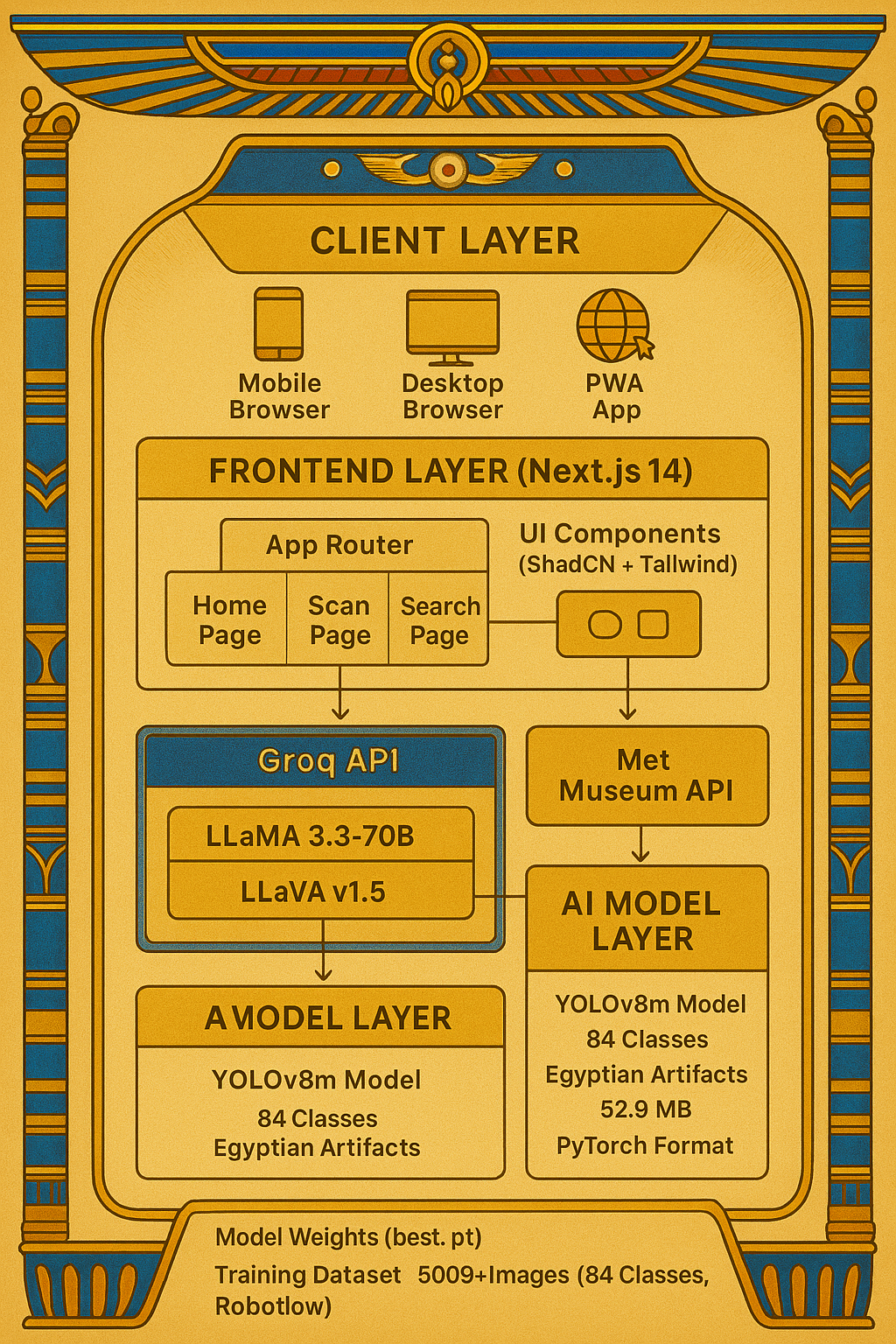
System Overview
Technology Stack
Frontend
- Framework: Next.js 14 (App Router)
- Language: TypeScript
- Styling: Tailwind CSS
- UI Components: ShadCN UI, Lucide React
- State Management: React Hooks
- API Client: Axios, Fetch API
Backend
- Framework: FastAPI
- ML Framework: Ultralytics YOLOv8
- Computer Vision: OpenCV, Pillow
- Model Format: PyTorch (.pt)
- API Documentation: OpenAPI (Swagger)
AI & ML
- Object Detection: YOLOv8m (84 Egyptian artifact classes)
- NLP Model: Groq LLaMA 3.3 (70B)
- Vision Model: LLaVA v1.5 (7B)
- Training Dataset: Roboflow (augmented with custom Egyptian artifacts)
External APIs
- Museum Data: The Met Museum API
- AI Processing: Groq API
- Image Hosting: Cloudinary / Met Museum CDN
Data Flow
graph LR
    A[User] -->|Upload Image| B[Next.js Frontend]
    B -->|POST /api/detect| C[Next.js API Route]
    C -->|Forward Image| D[FastAPI Backend]
    D -->|YOLO Inference| E[YOLOv8 Model]
    E -->|Artifact ID| D
    D -->|Detection Result| C
    C -->|Fetch Context| F[Groq AI]
    F -->|Historical Analysis| C
    C -->|Combined Response| B
    B -->|Display Result| A
📊 Model Performance
YOLOv8m Training Results
| Metric | Value |
|---|---|
| Model | YOLOv8m |
| Classes | 84 Egyptian artifacts |
| Training Images | 5,000+ (augmented) |
| Validation mAP@0.5 | 89.3% |
| Validation mAP@0.5:0.95 | 72.1% |
| Inference Time (GPU) | ~25ms |
| Inference Time (CPU) | ~180ms |
| Model Size | 52.9 MB |
Detected Artifact Categories
📜 View All 84 Artifacts (Click to expand)
**Pharaohs & Royalty (22)** - Akhenaten - Amenhotep III (multiple variants) - Tutankhamun statues and mask - Ramesses II statues - Queen Hatshepsut - Nefertiti bust **Monuments & Architecture (8)** - Great Pyramids of Giza - Sphinx variants - Pyramid of Djoser - Bent Pyramid of King Sneferu **Deities & Religious (12)** - Isis with child - Osiris statues - Ptah representations - Ra-Horakhty - Sekhmet seated statues **Funerary Objects (6)** - Mask of Tutankhamun - Coffin of Ahmose I - Various sarcophagi **And 36 more iconic artifacts...**🚀 Installation
Prerequisites
- Node.js 18+ and npm/yarn
- Python 3.8+
- Git
- Groq API Key (Get one here)
Quick Start
1️⃣ Clone Repository
git clone https://github.com/nouran25/Egyptian-Museum-Artifact-Detection.git
cd Egyptian-Museum-Artifact-Detection
2️⃣ Setup Backend (FastAPI)
# Navigate to backend
cd backend

# Create virtual environment
python -m venv venv
source venv/bin/activate  # On Windows: venv\Scripts\activate

# Install dependencies
pip install -r requirements.txt

# Download model (or place your trained model)
# Place 'best.pt' in backend/ directory

# Start server
python main.py
Backend will run at: http://localhost:8000
3️⃣ Setup Frontend (Next.js)
# Navigate to frontend (or project root)
cd ..

# Install dependencies
npm install

# Create environment file
cp .env.example .env.local

# Add your API keys
# Edit .env.local:
GROQ_API_KEY=your_groq_api_key_here
YOLO_BACKEND_URL=http://localhost:8000/detect-artifact
NEXT_PUBLIC_BASE_URL=http://localhost:3000

# Start development server
npm run dev
Frontend will run at: http://localhost:3000
📦 Environment Variables
Frontend .env.local
GROQ_API_KEY=gsk_xxxxxxxxxxxxx
YOLO_BACKEND_URL=http://localhost:8000/detect-artifact
NEXT_PUBLIC_BASE_URL=http://localhost:3000
Backend (Optional)
MODEL_PATH=best.pt
CONFIDENCE_THRESHOLD=0.5
💻 Usage
Scanning Artifacts
- Navigate to Scan Page: Click “Scan Artifact” on homepage
- Upload Image: Take photo or upload from gallery
- Wait for Detection: AI processes image in real-time
- View Results: See artifact name, confidence, and historical context
Searching Artifacts
- Navigate to Search Page: Click “Search Artifact” on homepage
- Enter Query: Type artifact name, culture, or keyword
- Browse Results: View matching artifacts from museum database
- Explore Details: Click any result for AI-generated analysis
Example API Request
# Detect artifact from image
curl -X POST http://localhost:8000/detect-artifact \
  -F "file=@/path/to/artifact-image.jpg"

# Response
{
  "artifact_id": "Mask of Tutankhamun",
  "confidence": 0.956,
  "class_id": 36,
  "detections_count": 1
}
📚 API Documentation
Backend Endpoints
POST /detect-artifact
Detect artifact in uploaded image
Request:
Content-Type: multipart/form-data
file: File (image/jpeg, image/png)
Response:
{
  "artifact_id": "Sphinx of Hatshepsut",
  "confidence": 0.923,
  "class_id": 16,
  "detections_count": 1
}
GET /model-info
Get model configuration and available classes
Response:
{
  "loaded": true,
  "num_classes": 84,
  "confidence_threshold": 0.5,
  "total_artifacts": 84
}
GET /artifacts
List all detectable artifacts
Response:
{
  "artifacts": [
    {"class_id": 0, "artifact_name": "Akhenaten"},
    {"class_id": 1, "artifact_name": "Amenhotep III"}
  ],
  "total": 84
}
Frontend API Routes
POST /api/detect
Combined detection and analysis
Request:
Content-Type: multipart/form-data
file: File
Response:
{
  "artifact_id": "Statue of Khufu",
  "confidence": 0.91,
  "analysis": "The Statue of Khufu represents...",
  "success": true
}
POST /api/analyse
Get AI-generated cultural analysis
Request:
{
  "artwork": {
    "title": "Sphinx of Hatshepsut",
    "culture": "Egyptian",
    "objectDate": "ca. 1479–1458 B.C."
  }
}
Response:
{
  "data": "The Sphinx of Hatshepsut is a remarkable...",
  "success": true,
  "model_used": "llama-3.3-70b-versatile"
}
🎨 Project Structure
Egyptian-Museum-Artifact-Detection/
├── app/                          # Next.js app directory
│   ├── page.tsx                  # Homepage
│   ├── scan/
│   │   └── page.tsx             # Artifact scanning page
│   ├── search/
│   │   └── page.tsx             # Artifact search page
│   └── api/
│       ├── detect/route.ts      # Detection API route
│       └── analyse/route.ts     # AI analysis route
├── backend/
│   ├── main.py                  # FastAPI application
│   ├── best.pt                  # YOLOv8 trained model
│   └── requirements.txt         # Python dependencies
├── components/                   # Reusable React components
├── lib/                         # Utility functions
│   └── museumAPI/
│       ├── index.ts            # API client
│       └── types.ts            # TypeScript types
├── public/                      # Static assets
├── assets/                      # README assets (screenshots, diagrams)
├── model_training/              # Training scripts and results
├── .env.local                   # Environment variables (local)
├── next.config.js              # Next.js configuration
├── tailwind.config.js          # Tailwind CSS configuration
├── package.json                # Node.js dependencies
└── README.md                   # This file
🔬 Model Training
Dataset Preparation
Our model was trained on a custom dataset of Egyptian artifacts:
- Data Collection: 5,000+ images from multiple sources
- Annotation: Labeled using Roboflow with bounding boxes
- Augmentation: Rotation, scaling, brightness adjustment
- Split: 70% training, 20% validation, 10% testing
Training Process
from ultralytics import YOLO

# Load pretrained model
model = YOLO('yolov8m.pt')

# Train on custom dataset
results = model.train(
    data='data.yaml',
    epochs=150,
    imgsz=640,
    batch=16,
    patience=50,
    name='egyptian_artifacts'
)

# Validate
metrics = model.val()

# Export
model.export(format='onnx')
Training Configuration (data.yaml)
path: ../dataset
train: train/images
val: valid/images
test: test/images

nc: 84  # number of classes
names: [
  'Akhenaten',
  'Amenhotep III',
  'Mask of Tutankhamun',
  # ... 81 more artifacts
]
🚢 Deployment
Frontend (Vercel)
# Install Vercel CLI
npm i -g vercel

# Deploy
vercel --prod

# Set environment variables in Vercel dashboard
Backend (Railway)

# Install Railway CLI
npm i -g @railway/cli

# Deploy
railway up

# Configure environment
railway variables set MODEL_PATH=best.pt
Docker Deployment (Optional)
# Backend Dockerfile
FROM python:3.10-slim
WORKDIR /app
COPY requirements.txt .
RUN pip install -r requirements.txt
COPY . .
EXPOSE 8000
CMD ["uvicorn", "main:app", "--host", "0.0.0.0", "--port", "8000"]
🧪 Testing
Run Tests
# Frontend tests
npm test

# Backend tests
cd backend
pytest tests/

# End-to-end tests
npm run test:e2e
Manual Testing Checklist
- Upload image of known artifact
- Verify detection accuracy (>80% confidence)
- Check AI analysis generates properly
- Test search functionality
- Verify mobile responsiveness
- Check error handling (invalid images, network errors)
🤝 Contributing
We welcome contributions! Here’s how you can help:
🐛 Reporting Bugs
- Check existing Issues
- Create new issue with:
- Clear description
- Steps to reproduce
- Expected vs actual behavior
- Screenshots if applicable
✨ Suggesting Features
- Open a Feature Request
- Describe the feature and use case
- Explain why it would be valuable
🔧 Submitting Pull Requests
- Fork the repository
- Create feature branch:
git checkout -b feature/amazing-feature - Make changes and commit:
git commit -m 'Add amazing feature' - Push to branch:
git push origin feature/amazing-feature - Open Pull Request with description
📝 Code Style
- Frontend: Follow ESLint configuration
- Backend: Follow PEP 8 guidelines
- Commits: Use conventional commit messages
📄 License
This project is licensed under the MIT License - see the LICENSE file for details.
MIT License

Copyright (c) 2024 Egyptian Museum Artifact Detection Team

Permission is hereby granted, free of charge, to any person obtaining a copy
of this software and associated documentation files (the "Software"), to deal
in the Software without restriction...
🙏 Acknowledgments
- The Metropolitan Museum of Art - Open API access
- Roboflow - Dataset management and augmentation
- Groq - Blazing-fast AI inference
- Ultralytics - YOLOv8 framework
- Vercel - Frontend hosting
- Railway - Backend hosting
📞 Contact & Support
- Project Repository: github.com/nouran25/Egyptian-Museum-Artifact-Detection
- Issues: GitHub Issues
- Email: nouranmostafa520@gmail.com
🗺️ Roadmap
✅ Phase 1 (Completed)
- YOLOv8 model training (84 artifacts)
- FastAPI backend implementation
- Next.js frontend with scan/search
- Groq AI integration
- Basic deployment
🚧 Phase 2 (In Progress)
- Interactive quiz system
- User profile types (Child/Student/Tourist)
- Arabic language support
- Audio narration (TTS)
- Offline mode
🔮 Phase 3 (Planned)
- AR artifact reconstruction
- Gamification & rewards system
- Multi-museum support
- Mobile apps (iOS/Android)
- Analytics dashboard
- Admin panel for museums